Seamless WooCommerce Integration
for e-commerce and SMEs
- Fully Automated Fulfilment: WooCommerce orders auto-import and auto-book with your preferred carriers—no manual entry required.
- Real-Time Prices at Checkout: Show live Ecoparcel delivery options—home delivery and parcel lockers—priced with your account rates and converted to your store currency.
- Instant Shipment Status: Orders are automatically updated to “Completed” and tracking numbers are added in WooCommerce as soon as your order ships.
- Centralised Order View: Manage all unfulfilled WooCommerce orders in one intuitive Ecoparcel dashboard.
- Fewer Support Queries: Customers track their parcels via clickable tracking URLs directly in WooCommerce.
- Optimised Carrier Rates: Leverage cheaper shipping rates and generate labels in a single click.
- 5-Minute, No-Code Setup: Install the Ecoparcel WooCommerce plugin and be dispatch-ready without any developer help.

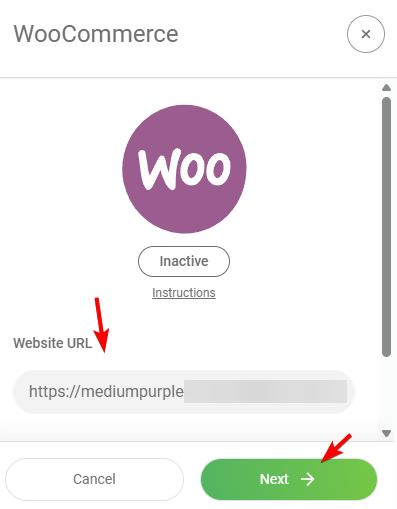
Enter your stores URL
- In Ecoparcel, navigate to Integrations > WooCommerce.
- When the modal opens (status: Inactive), paste your store’s full URL (including https://) into the Website URL field.
- Click Next to proceed.
Authorise the integration
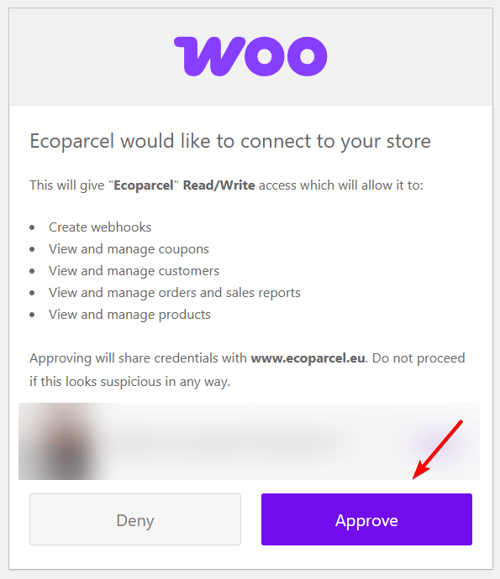
- You’ll be redirected to your WooCommerce store’s authorisation page.
- Review the requested permissions (Read/Write: webhooks, orders, customers, products).
- Click the purple Approve button to grant Ecoparcel access.
Store is connected!
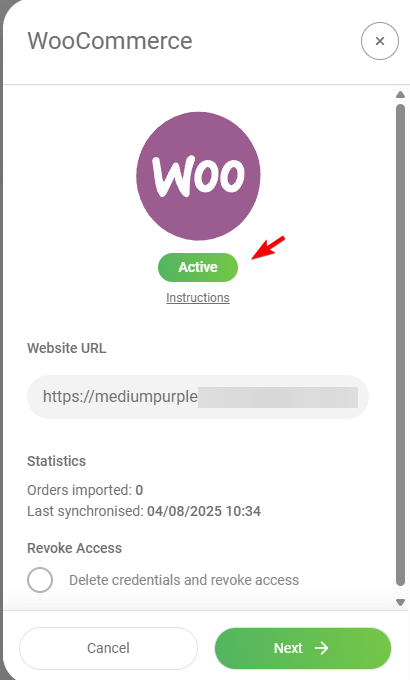
- After approval, the integration modal returns to Ecoparcel showing status Active.
- Verify your Website URL is displayed correctly.
- Check the sync stats: Orders imported and Last synchronised.
Unfulfilled orders being imported
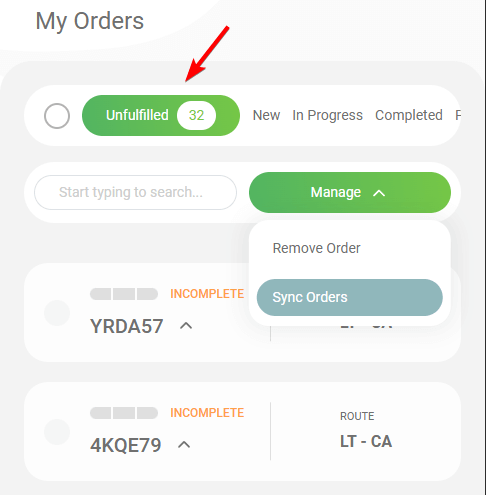
- In Ecoparcel’s dashboard, go to My Orders.
- Select the Unfulfilled tab (shows number of new orders).
- Click the Manage dropdown and choose Sync Orders to pull in any recent WooCommerce orders.
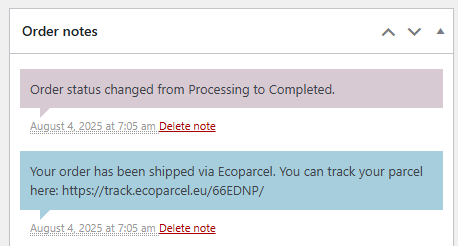
Status and Tracking Updated
- Once the order is paid, Ecoparcel marks the order as shipped, and WooCommerce will receive:
- An order status change to Completed.
- An Order Note with the Ecoparcel tracking link.
Show live rates at your checkout
- In Ecoparcel, open Integrations -> WooCommerce and copy your Connection key (shown once the integration is Active).
- Download the Ecoparcel Shipping plugin and install it in WordPress admin via Plugins -> Add New -> Upload Plugin, then activate it.
- Go to WooCommerce -> Settings -> Shipping, open a shipping zone and add the Ecoparcel shipping method.
- Edit the method, paste your Connection key and save. Optionally set a fallback rate shown if live rates are temporarily unavailable.
- Your buyers now see live Ecoparcel delivery options at checkout—best value first, VAT included, in your store currency. Keep product weights filled in, as they drive the pricing.